The Biggest AI Logo Problems Nobody Talks About

SD Team • May 5, 2026

Prefer to listen to this blog post?

A logo can look good on a screen and still fall apart the second you try to use it in the real world. That is the fundamental disconnect between AI-generated images and actual brand identity. Most business owners think they have a finished logo, but they are often left with a single, unscalable file that looks amateur the moment it moves off a white screen.


One home restoration company came in with a Bigfoot logo idea that was close, but not done. The concept had personality, but the file was a technical failure. Understanding that gap—between a fun visual idea and a production-ready brand asset—is the difference between a business that looks professional and one that looks like a series of digital workarounds.

Key Takeaways

  • AI logo tools often deliver raster images like PNG or JPEG that look fine on screen but fail when resized, printed, or placed on different backgrounds, lacking the scalability of vector files.

  • A single logo image isn't enough; a finished brand needs multiple versions, including full-color, one-color, reversed/inverted, horizontal, and vertical layouts to work across websites, shirts, trucks, and signs.

  • Fixed white backgrounds and generic type kill flexibility, making the logo look unfinished in real-world uses like dark shirts or colored flyers.

  • AI concepts are a good start, but human redesign—tracing, refining, and customizing—creates production-ready files that survive print, digital, and legal scrutiny.

  • Before approving, test if your logo holds up everywhere it will appear, or risk workarounds like fuzzy prints and awkward crops.

A customer had a logo idea, but not a usable logo

This project started the way a lot of them do now. A customer spent a good chunk of time working with an AI tool, writing prompts to create AI-generated logos that matched what was in their head. They were a home restoration company, and Bigfoot was part of the idea because of an inside joke tied to the business.


The concept came through. Bigfoot, trees, a house, that part was there. But the finished file still missed the mark without the right brand context.


It took a long time, and it still didn't get all the way there.

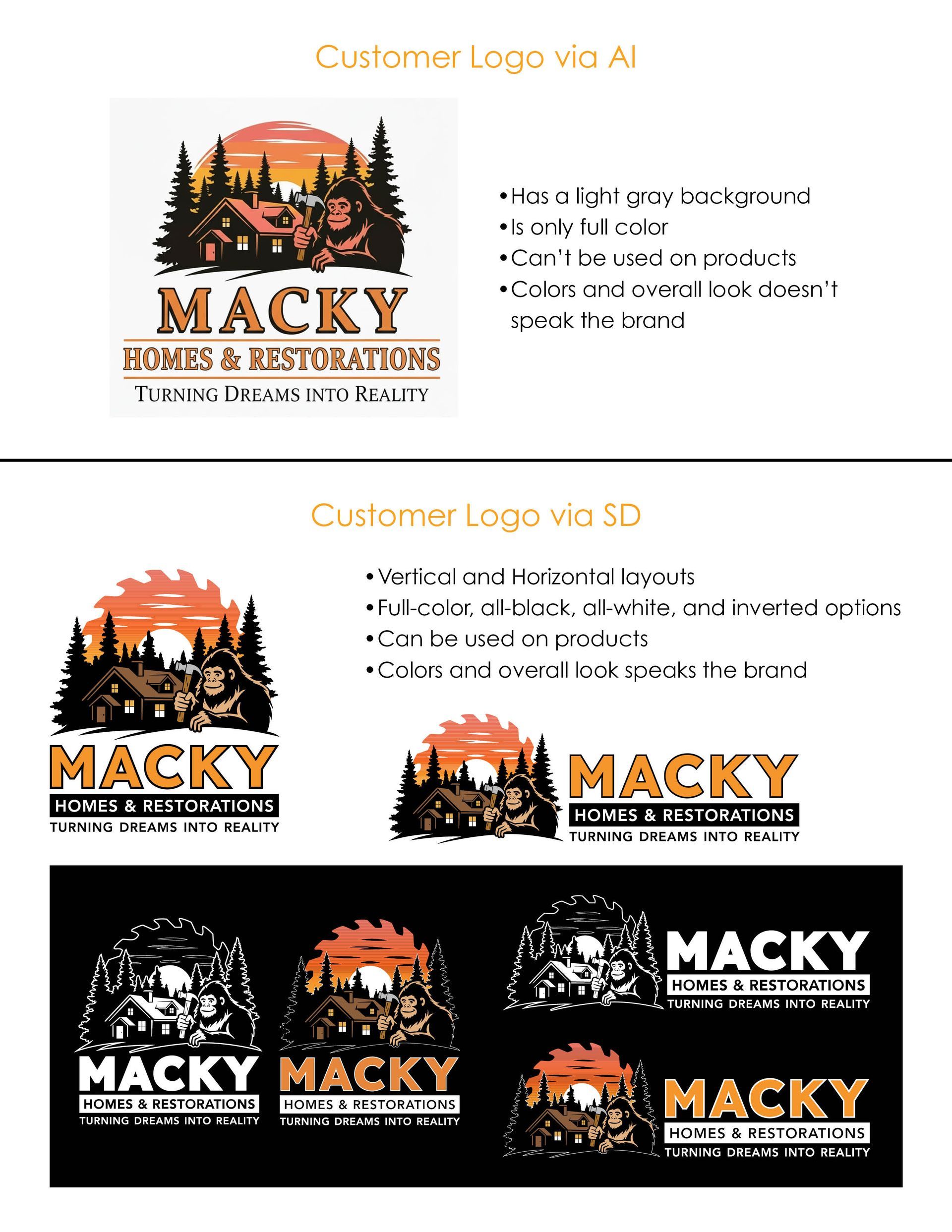
AI vs Human logo design for Mack Homes.

What they had was one image file, a JPEG raster image, with the background baked into it. That sounds minor until you try to use it somewhere other than a white screen.


Right away, there were a few problems:

  • It was a single raster image, not a full logo package.
  • The white background was locked in.
  • It looked okay online, but it wasn't built for print.
  • The type felt generic and didn't match the business well.
  • It had no alternate layouts for different uses.


That's the blind spot. A lot of business owners think, "I have the logo, so I'm done." But if you only have one image, unlike the versatile package a human designer delivers, you're usually not done. You're still at the rough draft stage.


If your logo only works on one white background at one size, you don't have a finished logo. You have a draft.


For service businesses, that matters. A logo doesn't live in one place. It ends up on a website header, invoice, social profile, truck magnet, shirt, business card, yard sign, mug, and probably a few places you didn't think about when you first made it. One file won't carry all of that.


Why AI Logo Problems Occur After the Screen


Raster vs. vector, in plain English

Here's the technical part, but it doesn't need to be complicated.


Most AI logo tools give you a PNG or JPEG. Those are raster images. Raster means the image is built from pixels. On a screen, that can be totally fine. Put it in an email signature or on a quick web graphic, and it may look clean enough.

The problem shows up when you resize it, print it, or place it on products.


A proper logo also needs vector format files. Vector art isn't made of pixels. It's built from mathematical curves, paths, and shapes, which means it can scale up or down without getting fuzzy. That's why vectors are what printers, sign shops, and apparel decorators want. Adobe Illustrator explains that difference well in its raster vs. vector breakdown.

A simple way to think about it is this:

File Type Best For What Goes Wrong
JPEG Quick previews, photos, casual use No transparency, soft edges, poor print flexibility
PNG Websites, social media, email signatures Better than JPEG for digital, still pixel-based
SVG / AI / EPS / PDF Print, signs, apparel, scaling Needs proper setup and clean artwork

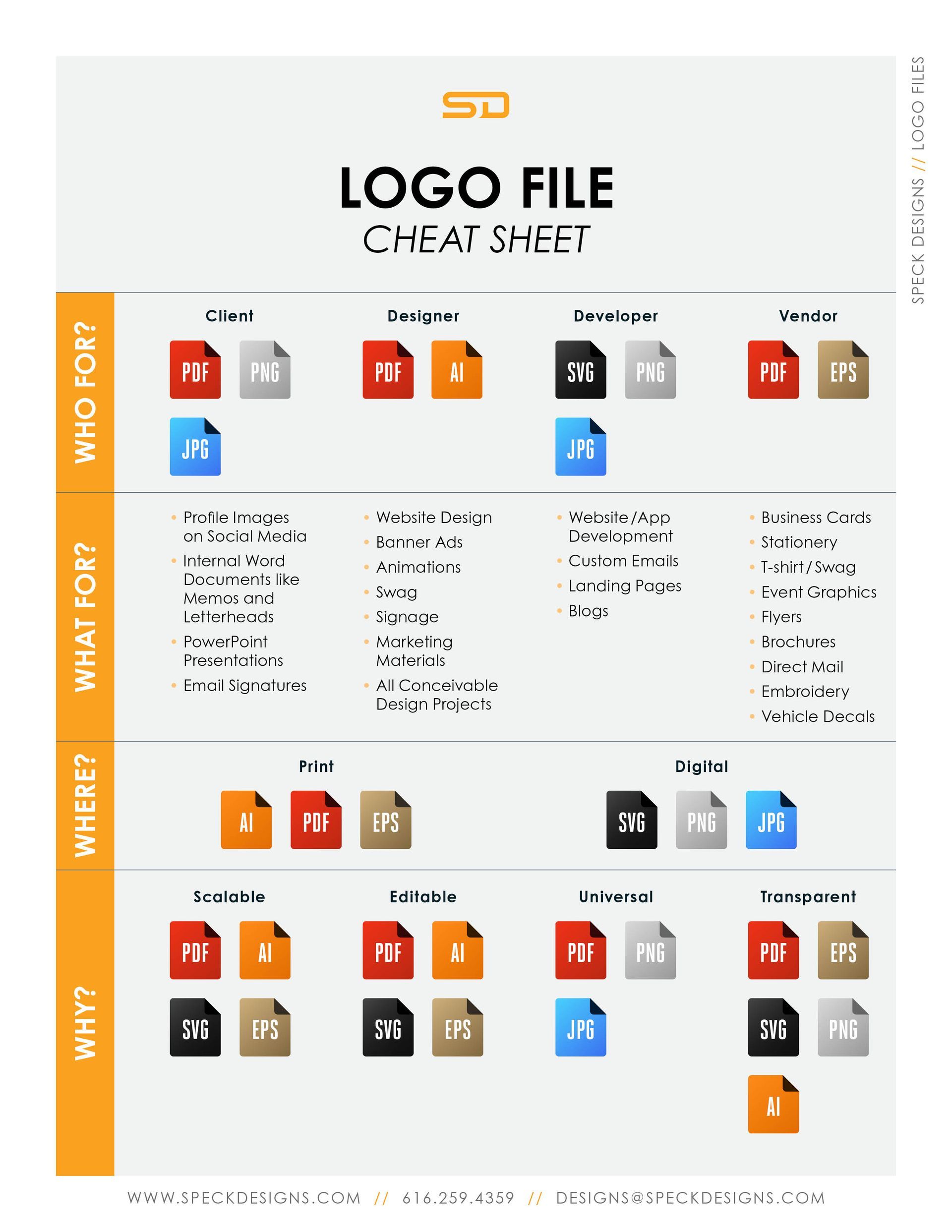
That is why one logo image is not enough. In the video, the point was six core versions, three set up for print and three for web or digital use. The exact package can vary, but the principle doesn't. A real logo system needs multiple file types because different jobs need different tools. You can download our Speck Designs Logo File Cheat Sheet for a better understanding.

Logo file style guide with multiple colored icon variations on a white layout

One more thing that gets missed, even by smart owners trying to save time, is this: some AI tools now claim to export vector files. That sounds like the problem is solved. Not always. A file can be labeled SVG and still be a mess under the hood. VectorWiz's write-up on fixing AI-generated logos for print points out that these files can have sloppy paths, extra anchor points, and a weird structure that creates problems in production.


So before you approve a logo, ask a harder question: can this thing survive real use, or does it only look good in a mockup?


The white background problem is bigger than it looks

The background issue is one of those problems people shrug off until it bites them.


In this case, the original logo had a white box around it. On a white page, you might not notice it at first. Put that same logo on a black shirt, a dark website section, a colored flyer, or a truck graphic, and suddenly the white rectangle is all you can see.


That kills flexibility. It also makes the brand look unfinished.


A transparent background is the bare minimum for digital use. But even that doesn't solve the whole problem, because transparency still doesn't fix the scaling issue. A clean PNG with transparency is helpful. A vector file is what gives you long-term control.


The Legal Question: Copyright Ownership and AI

There was another issue sitting behind all of this, too. File format is the first risk. Ownership can be the second. Some AI logo tools are vague on commercial rights and trademark questions. If the logo is going on shirts, vans, signage, and paid marketing, that's not a detail to ignore.


AI-generated logos often lack clear copyright ownership compared to work from a human designer, which can expose businesses to trademark infringement risks. Without a solid licensing agreement, you might not have full rights to use the design commercially. This breakdown of AI logo print and trademark risks gets into why.


How the Bigfoot logo got fixed


First came the quick trace

The first step wasn't some big, dramatic redesign. It was a test.


Take the core idea, trace it, clean it up enough to see what the concept could become, and stress-test it on different backgrounds using design thinking. That part matters because a logo that looks okay in full color on white can completely disappear on dark backgrounds.


In the quick trace version, the image was redrawn loosely and the font was changed. The goal wasn't perfection yet. It was to see how the mark behaved.


That test surfaced a few things right away:

  • A black version on white worked fine.
  • A white version on black gave a useful reversed option.
  • Some design elements disappeared on dark backgrounds.
  • The trees and darker pieces lost definition.
  • The original type style still wasn't strong enough.


That's a big part of logo work that AI usually skips. A business owner sees one output. A designer sees failure points. What vanishes on black? What gets muddy at small sizes? What looks cheap when embroidered? What becomes unreadable in a website header?


Those aren't nitpicks. They're where bad logos show themselves.


The original concept also had that pink sunset feel in the character. That may have been what the AI was trying to do visually, but it wasn't the right fit for the business. A home restoration brand with Bigfoot in the mark needed something sturdier and more grounded, not something that felt accidentally sunburned.


Then came the real redraw

Once the test versions exposed the weak spots, the real work started.


The logo was redrawn cleanly through professional graphic design. Not filtered. Not patched. Redrawn.


That redraw included a few meaningful changes. Exploring customization options, a saw blade was added into the background to tie the design back to home restoration work. That wasn't random decoration. It supported what the business does. The font was changed to something blockier and more prominent, which gave the name more weight. The color scheme was also reworked.


The pink tone got pulled back. Bigfoot became brown, with a lighter brown that made the figure stand out better. Orange ended up making more sense for the overall brand feel after a feedback loop, talking through options with the owner.


That part matters too. Good logo work isn't only about drawing. It's about decision-making. What should feel rugged? What should feel readable? What actually fits the owner and the business, not just the first thing a generator spits out?


Even then, the job still wasn't finished. On darker backgrounds, some black details still dropped out. The tagline could disappear. Tree silhouettes could flatten out. So the design had to keep getting adjusted until it worked in more than one scenario.


That is the part people don't see when they say, "AI made me a logo." No, AI gave you a starting image. The design process starts after that.

One logo isn't enough for a real business

A finished professional logo isn't one file. It's a visual identity system.


That's why, unlike logo generators that provide just one image, this project didn't stop at the main mark. It expanded into one-color versions, reversed versions, vertical and horizontal layouts, and background-ready options. Because a logo that works on a white square doesn't automatically work in a website header or on a mug.


Before you approve any logo, ask this: can it go on a dark hoodie, a business card, a truck door, a coffee mug, and a homepage without looking hacked together?


Here are the versions that matter most:

Version Why It Matters Common Use
Full-color vertical Strong primary mark Social profiles, flyers, signage
Full-color horizontal Better fit for wide spaces Website headers, banner graphics
One-color version Lower-cost and specialty printing Mugs, shirts, stamps, vinyl
Reversed on dark Keeps contrast on dark surfaces Black shirts, dark web sections, promo items

The horizontal version is a great example of something AI often doesn't think about. On a website, a stacked logo can eat up way too much header space. A wide version fits better and gives you more breathing room in the layout. This helps maintain brand storytelling across platforms. That's a practical reason to have alternate orientations, especially if you're building out custom website design services around the brand.


The same logic applies to print. A logo that looks fine on a screen can still fall apart on a shirt, business card, or promo item if the files aren't production-ready. That's why print-ready formats matter when you're ordering through professional printing services.


None of this is overkill. It's basic brand usability.


From one AI image to eight working logo versions

By the end of the process, the business didn't have one image anymore. It had a usable brand set.


That meant full-color versions, one-color versions, dark-background versions, vertical layouts, and horizontal layouts. The mark could now live on print pieces and digital platforms without changing personality every time it moved.


The jump was big, but the reason was simple. The final logo set was built to handle real-world use.


The text became more prominent. The icon became cleaner, communicating more effectively with the target audience. The colors made more sense. The brand could sit on a black background and still hold its shape. It could go into a website header without forcing awkward spacing. It could print cleanly with superior image resolution, free from the pixel limits that plague typical AI outputs, without turning into a fuzzy mess.


That's the difference between "I have a logo" and "I have a brand asset I can count on."


AI can help with concepts. Speck Designs uses AI too. That's not the issue. The issue is stopping too early and mistaking the first decent-looking AI-generated logo for a finished identity, overlooking the originality that human refinement provides.


For a service business, that can create problems fast. You start ordering materials before the logo is ready. You build pages around a file that doesn't scale well. You keep finding little workarounds, white boxes, bad crops, fuzzy prints, color mismatches, and layout problems. Those aren't random annoyances. They are signs that the logo wasn't completed.


AI-Generated Logo Design Frequently Asked Questions


Why do AI-generated logos look bad when printed or resized?

AI tools usually output raster files like PNG or JPEG, made of pixels that get fuzzy when scaled up for print or signs. Vector formats like SVG or EPS use math-based shapes that stay sharp at any size, which printers require. A quick test: zoom in on your logo—if it pixels out, it's not ready.


What's the big deal with white backgrounds on AI logos?

A baked-in white background shows up as an ugly box on dark shirts, websites, or trucks, making the brand look amateur. Transparent PNGs help digitally, but only vectors give full control over any background. Always check how it behaves on black or colored surfaces before using it.


Do I really need multiple versions of my logo?

Yes, because logos live on websites, business cards, mugs, and vehicles—one file can't handle all that without issues. Full-color vertical works for social, horizontal fits headers, one-color suits cheap printing, and reversed versions save dark-background uses. Skipping this leads to layout hacks and inconsistent branding.


Are there legal risks with AI-made logos?

AI logos can have unclear copyright ownership and higher trademark infringement risks since they're trained on existing designs. Human designers provide clear commercial rights and originality. For shirts, signs, and marketing, get a proper license to avoid surprises.


How can I turn an AI logo into a usable brand asset?

Start with a quick trace to test scalability and backgrounds, then fully redraw in vector with custom tweaks like better fonts and business-specific details. Build out the full set of versions for print and digital. Professional logo redesign services can refine your AI concept into files that work everywhere.


Final thoughts

The key AI logo problems come down to this: AI logo design concepts are not bad. The output often stops one step before what matters most: usability.


If your AI-generated logo only works as a single image on a white background, it isn't ready yet. A finished logo needs clean files, multiple versions, and a scalable design to hold up wherever your business shows up.


If you've got an AI-made concept that's close but not there, logo redesign services can turn that rough starting point into files that work on the web, in print, and everywhere in between. Stop settling for a draft and start building a brand you can use anywhere—reach out to us today to see how we can turn your AI concept into a finished, versatile logo system.

Steven, the owner of Speck Designs in front of mountains.

The copywriting team at Speck Designs writes about branding, web design, SEO, content strategies, and much more for service-based businesses. Our goal is to publish clear, usable guidance you can apply right away, whether you are improving a local SEO foundation, building better landing pages, or tightening your brand message. We focus on what drives leads, not just traffic.


Ready to see how Speck Designs can help you keep your best clients and fuel business growth? Schedule your call today. Let's build lasting client partnerships through elevated customer engagement and powerful reputation management together.


A man is using a lapotop to complete an online form on Lakeshore Barrier Frees website.
By SD Team April 21, 2026
Learn how to build website service area pages that rank in Google, match local intent, avoid duplicate content, and turn nearby searches into leads.
Infographic comparing a thriving business with an online presence against a stagnant business without one.
By SD Team April 14, 2026
Can a website designer help grow your business? Yes, by building a site that earns trust, ranks in search, and turns visitors into real leads.
A person at a desk with a laptop points at their phone screen with a confused, frustrated expression.
By SD Team March 27, 2026
Why isn't my website showing up on Google? Learn how to fix indexing issues, weak rankings, and Google Business Profile problems for local SEO.
SHOW MORE BLOGS